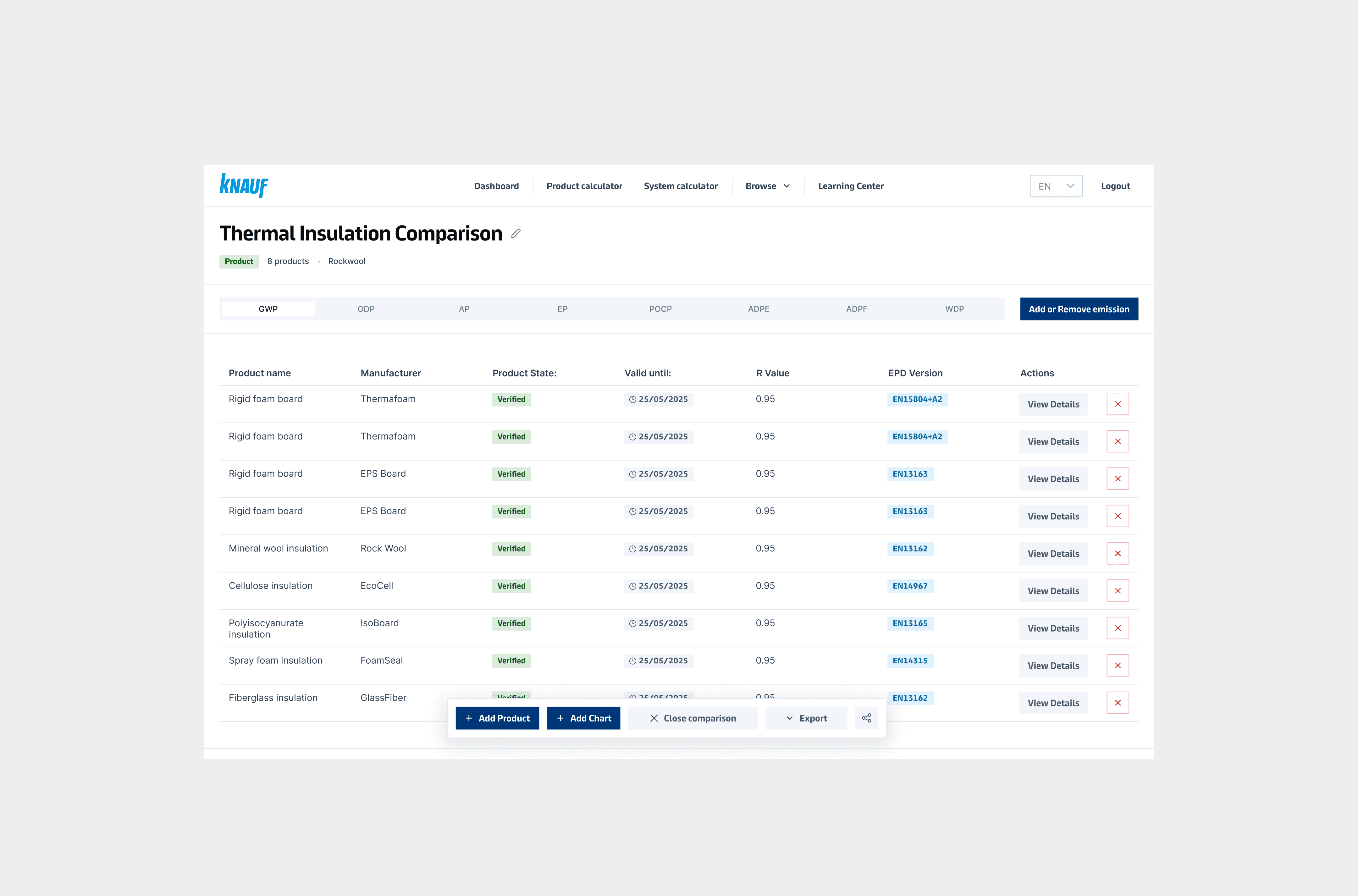
Knauf Ecoindex is an internal platform used by Knauf's sustainability and product teams to compare building materials based on their environmental performance — specifically EPD (Environmental Product Declaration) data. Version 1 was built as a functional MVP and served its purpose, but as usage grew, the cracks became apparent: the interface was difficult to navigate, the comparison flows were confusing, and the system wasn't built to scale.
The goal was a complete redesign — not just a visual refresh, but a structural rethink of how users interact with complex data. This project was delivered as part of a studio engagement.
Knauf Ecoindex is an internal platform used by Knauf's sustainability and product teams to compare building materials based on their environmental performance — specifically EPD (Environmental Product Declaration) data. Version 1 was built as a functional MVP and served its purpose, but as usage grew, the cracks became apparent: the interface was difficult to navigate, the comparison flows were confusing, and the system wasn't built to scale.
The goal was a complete redesign — not just a visual refresh, but a structural rethink of how users interact with complex data. This project was delivered as part of a studio engagement.
Deliverables
Deliverables
UX Architecture
UX Architecture
Year
Year
2025—2026
2025—2026
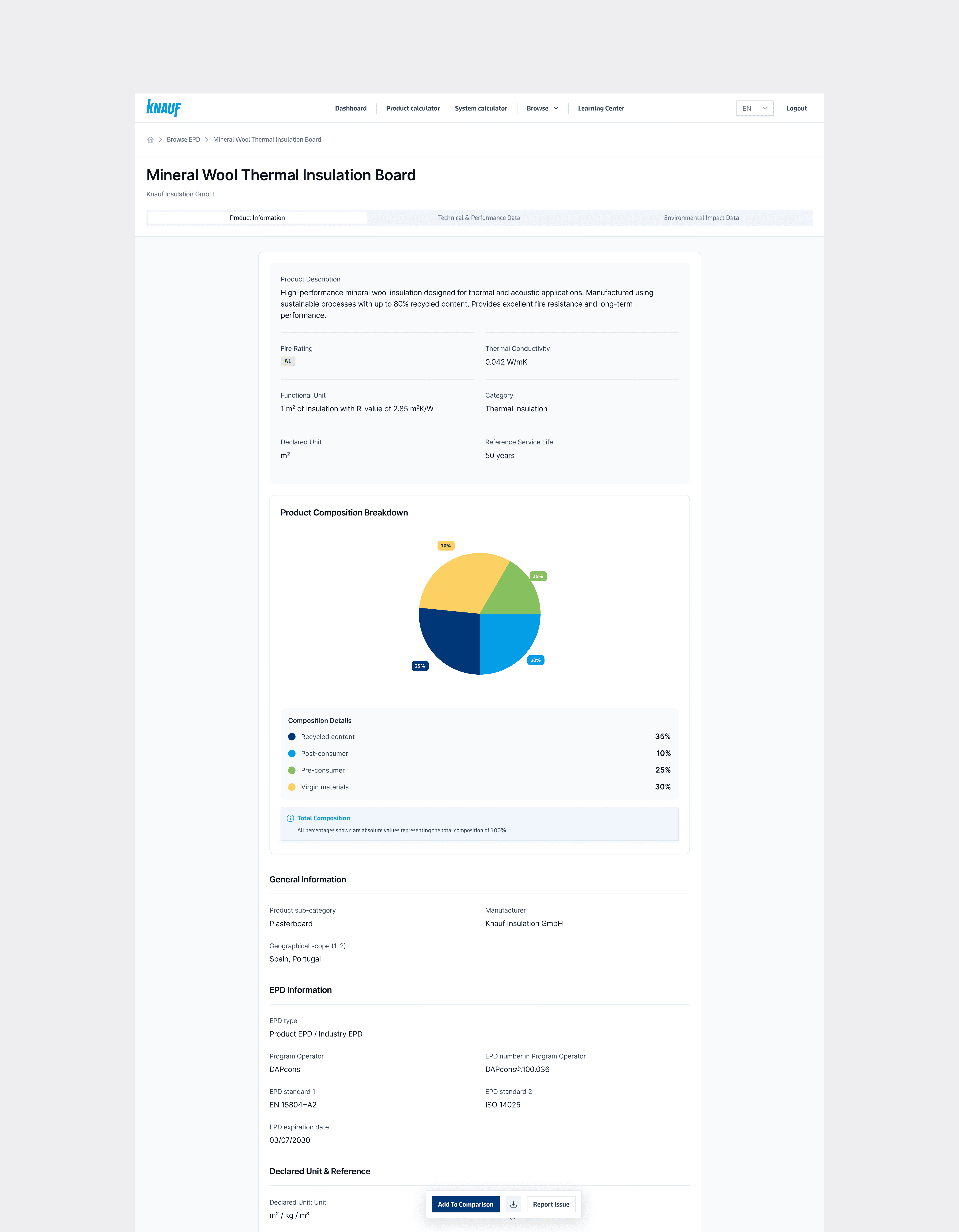
Product Overview
Product Overview
The Problem
Version 1 worked, but it created friction at every level. Long product names broke chart layouts. The mix of card and table views was inconsistent across screens. The comparison experience — the core function of the tool — was basic and confusing. There was no collaborative editing, no shared comparison states, and limited visibility into data changes for admins.
The users experiencing this most acutely were internal technical experts working with EPD data daily — people who needed speed, clarity, and confidence in the data they were reading.
Version 1 worked, but it created friction at every level. Long product names broke chart layouts. The mix of card and table views was inconsistent across screens. The comparison experience — the core function of the tool — was basic and confusing. There was no collaborative editing, no shared comparison states, and limited visibility into data changes for admins.
The users experiencing this most acutely were internal technical experts working with EPD data daily — people who needed speed, clarity, and confidence in the data they were reading.
Research & Pain Points
Without a formal research phase, the brief itself surfaced the key problems through stakeholder input and an audit of v1.
Five pain points defined the redesign scope:
Long product names were breaking chart readability and layout integrity. The UI mixed patterns without a clear system, making it harder for users to build mental models across screens. The comparison flow lacked the logic and structure users needed to make meaningful decisions. There was no way to collaborate or share states, limiting the tool's usefulness in team settings. And admin users had almost no visibility into what was happening in the system.
Without a formal research phase, the brief itself surfaced the key problems through stakeholder input and an audit of v1.
Five pain points defined the redesign scope:
Long product names were breaking chart readability and layout integrity. The UI mixed patterns without a clear system, making it harder for users to build mental models across screens. The comparison flow lacked the logic and structure users needed to make meaningful decisions. There was no way to collaborate or share states, limiting the tool's usefulness in team settings. And admin users had almost no visibility into what was happening in the system.
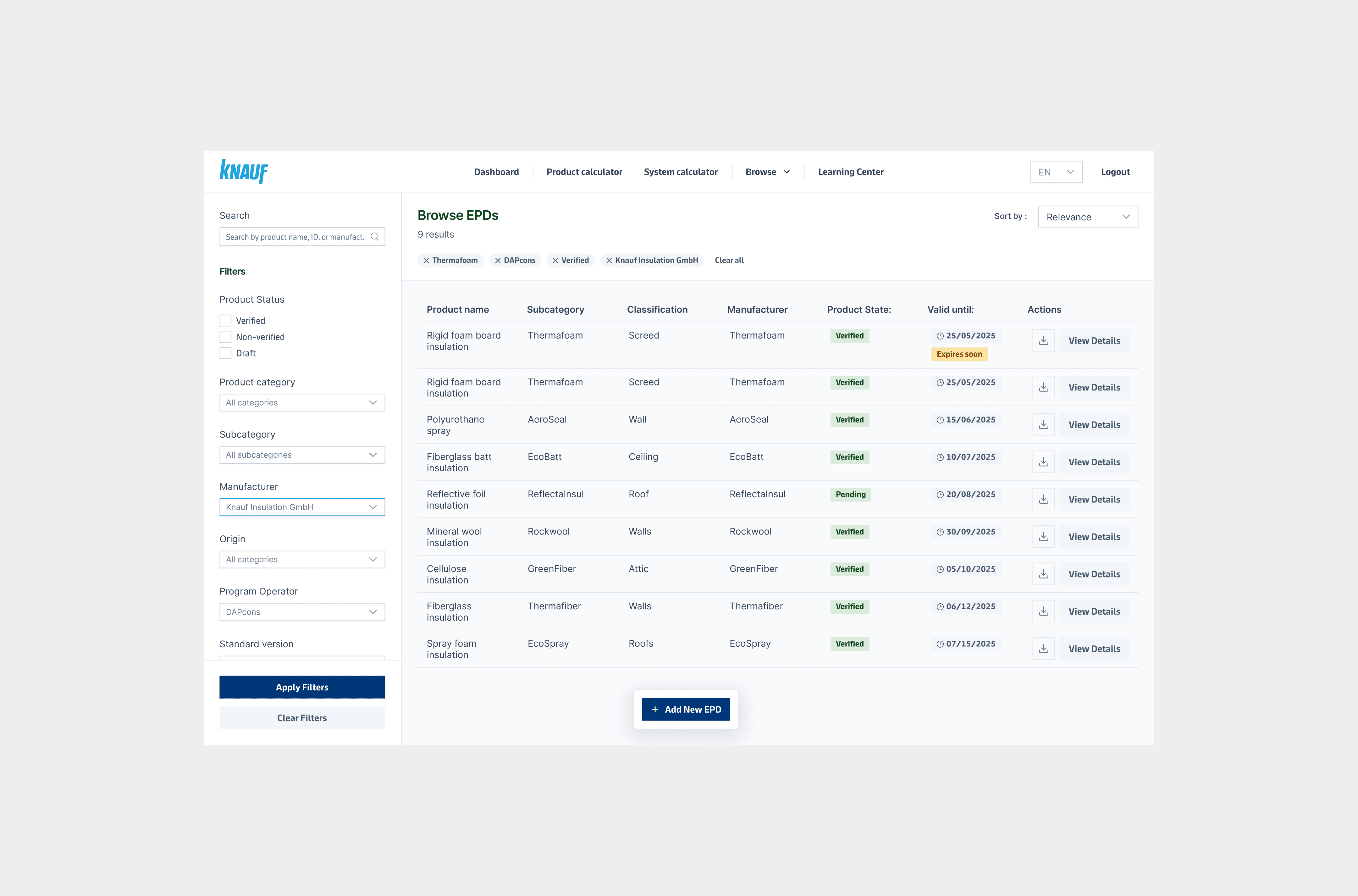
Browse EPD
Browse EPD
Information Architecture
The redesign was structured around three distinct layers: the Comparison System (the primary user-facing module), the Admin Back Office (internal data management), and a consistent Layout & Navigation framework shared across both.
The layout was anchored to a three-part structure — global navigation in the top bar, filters and controls in a collapsible left panel, and the main content area reserved for charts and data. This gave users a predictable spatial model regardless of which module they were in.
The redesign was structured around three distinct layers: the Comparison System (the primary user-facing module), the Admin Back Office (internal data management), and a consistent Layout & Navigation framework shared across both.
The layout was anchored to a three-part structure — global navigation in the top bar, filters and controls in a collapsible left panel, and the main content area reserved for charts and data. This gave users a predictable spatial model regardless of which module they were in.
Design Decisions
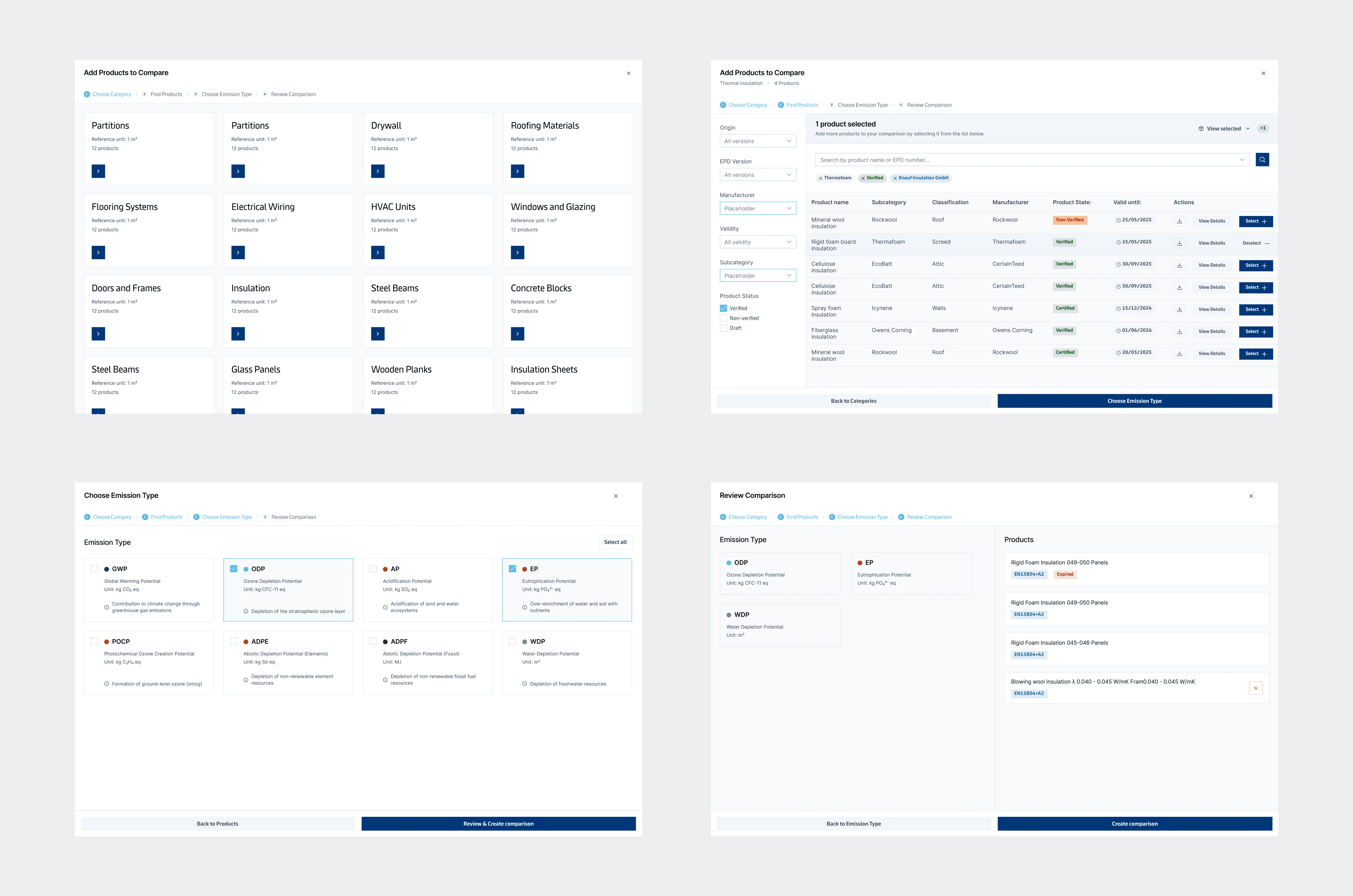
The comparison system was rebuilt from the ground up. Users can now compare multiple products across lifecycle stages, generate bar and pie charts, sort and filter results, and export comparisons as CSV or image. Long product names — one of the most persistent v1 issues — are handled through adaptive logic: tooltips, truncation, and flexible layout that degrades gracefully.
The admin panel was designed for clarity and speed over visual complexity. A table-based UI prioritises scannability, with a basic KPI dashboard giving admins a working overview of system activity.
Across both modules, the principle was consistency: the same interaction patterns, the same component behaviour, the same visual language — so users moving between areas of the product don't have to relearn the interface.
The comparison system was rebuilt from the ground up. Users can now compare multiple products across lifecycle stages, generate bar and pie charts, sort and filter results, and export comparisons as CSV or image. Long product names — one of the most persistent v1 issues — are handled through adaptive logic: tooltips, truncation, and flexible layout that degrades gracefully.
The admin panel was designed for clarity and speed over visual complexity. A table-based UI prioritises scannability, with a basic KPI dashboard giving admins a working overview of system activity.
Across both modules, the principle was consistency: the same interaction patterns, the same component behaviour, the same visual language — so users moving between areas of the product don't have to relearn the interface.
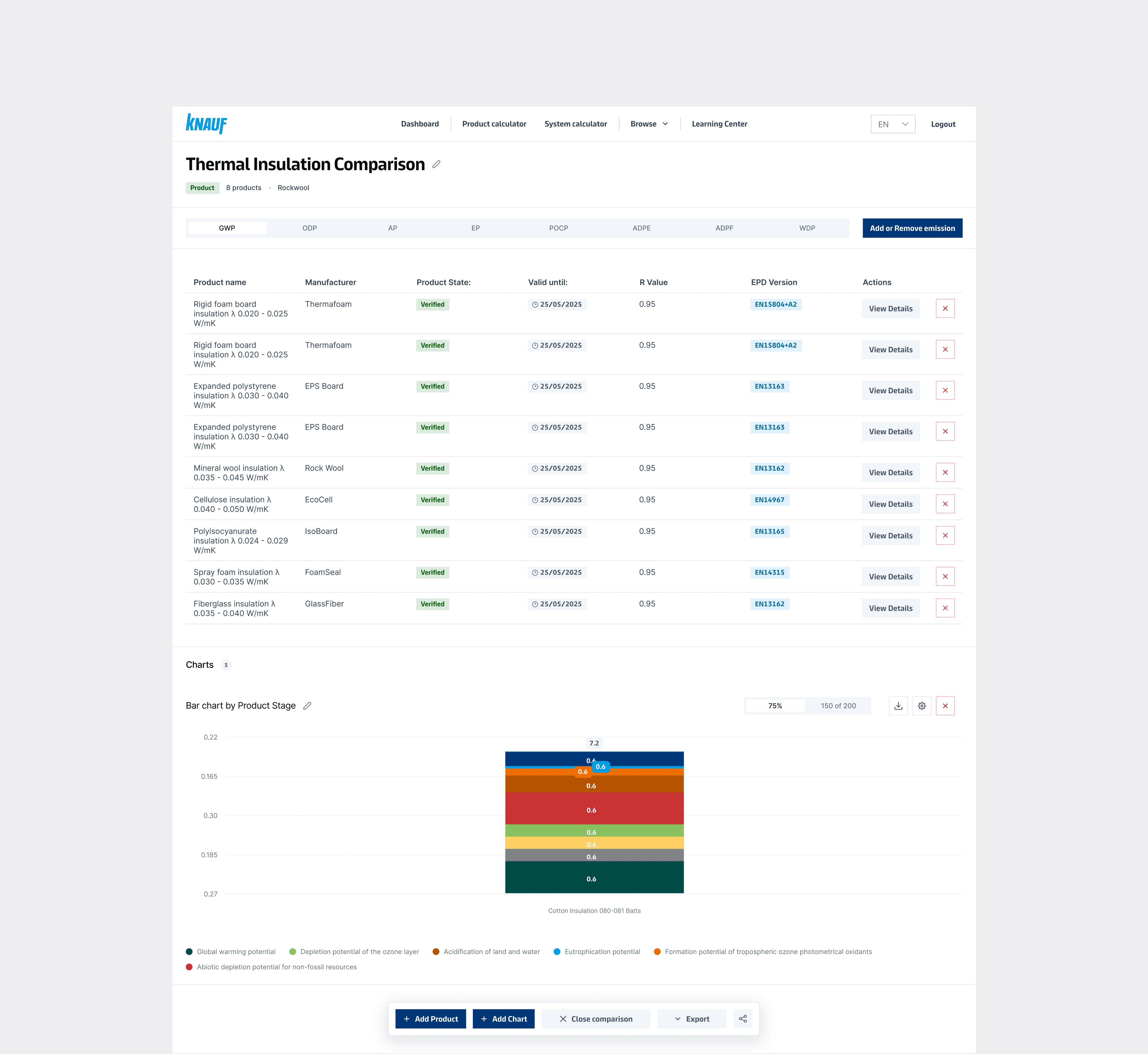
Product Comparison
Product Comparison
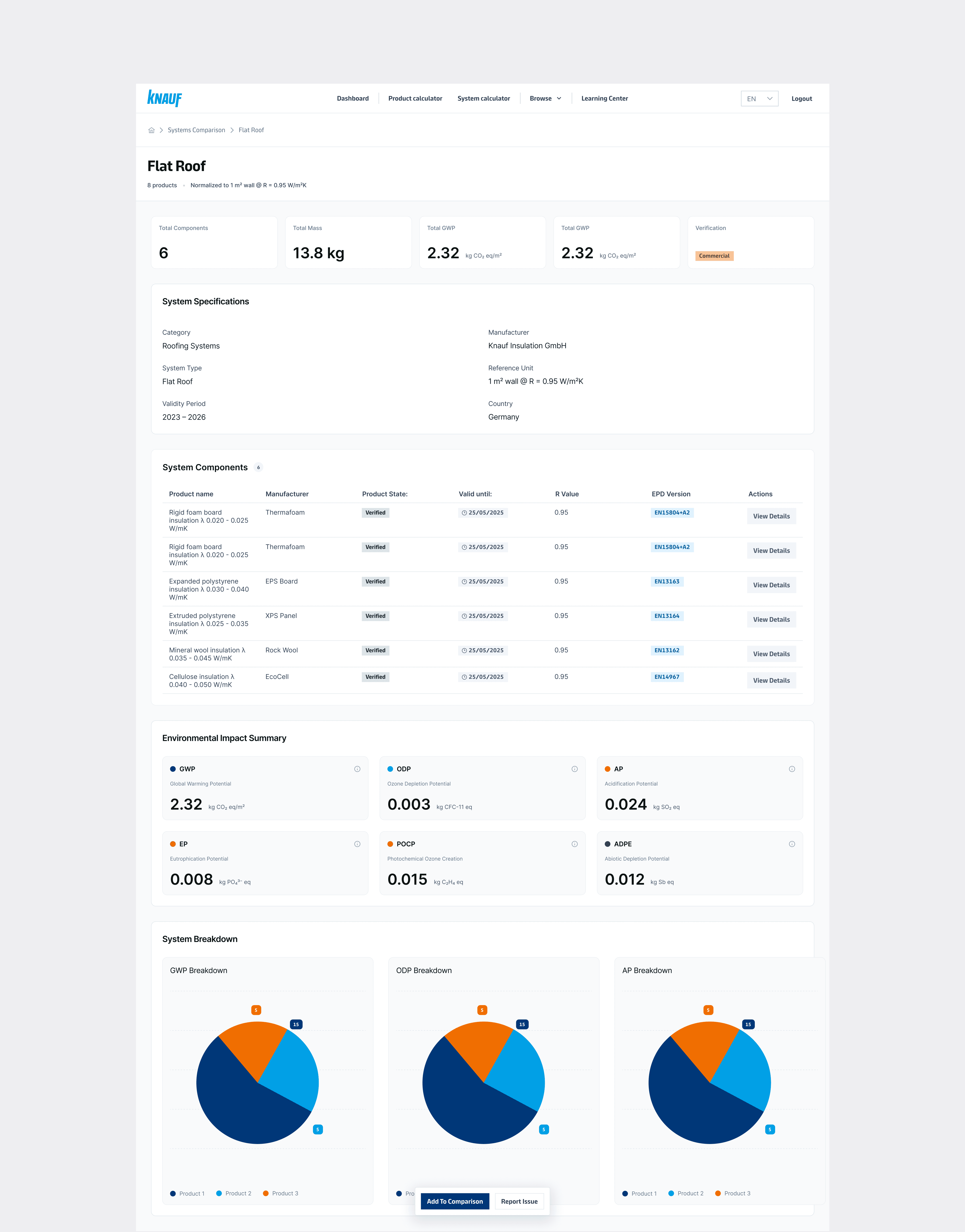
System Overview
System Overview
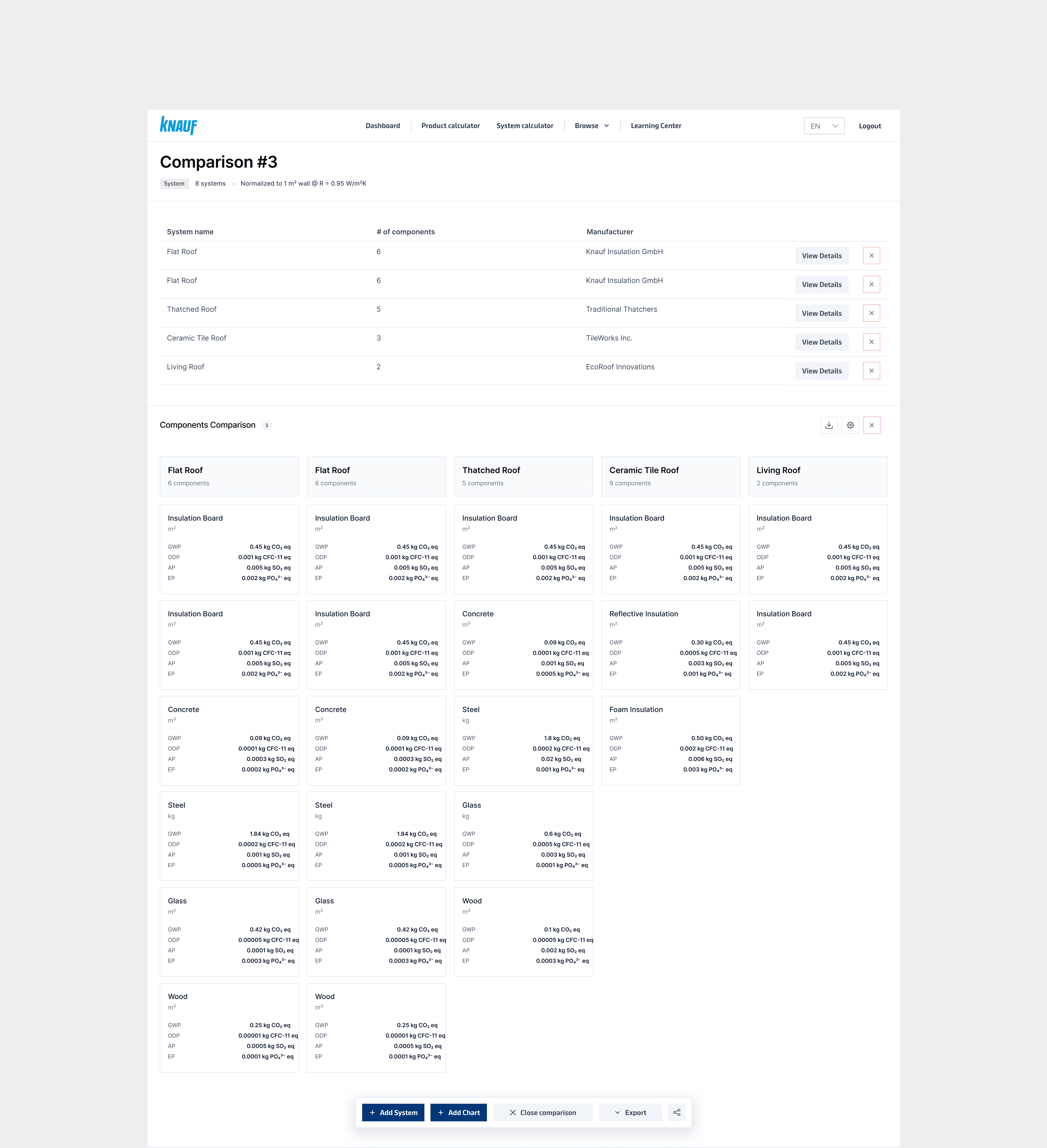
Components Comparison
Components Comparison
Reflection
The core design problems got solved — the comparison system was rebuilt with a logical, scalable structure, the admin experience was clarified, and the visual language established a foundation to carry the product forward. But final polish and handoff didn't happen; competing priorities paused the work before it crossed the finish line.
If the project continues, the next priorities would be usability testing on the comparison flow and refining the export experience based on real user feedback.
This project didn't reach a shipped state — competing priorities meant the work was paused before final polish and handoff. That said, the core design problems were solved: the comparison system was rebuilt with a logical, scalable structure, the admin experience was clarified, and the visual language established a foundation that could carry the product forward.
The main constraint was scope — a tool touching this many user types and data structures required more time than the project timeline allowed.
If continued, the next priorities would be usability testing on the comparison flow and refining the export experience based on real user feedback.
All Rights Reserved
All Rights Reserved
All Rights Reserved